
Before the breach: what to have ready so your business can recover quickly
A practical guide to incident-readiness for small businesses: who decides, what gets restored first, and how to rehearse recovery before a cyber incident happens.

On this page
Why it mattersDecideRestoreRehearseScopeUse itCloseIn short
- Decide in advance who can make the key calls during an incident.
- Write down what must be restored first, and what can wait.
- Rehearse recovery so people can act under pressure without guessing.
- Include suppliers and third-party dependencies in the plan.
- Keep the plan simple enough that people will actually use it.
Many small businesses think cyber security is mainly about prevention. In practice, the harder question is what happens when something gets through. The businesses that recover more cleanly are usually the ones that have already agreed who makes decisions, what matters most, and how the first day of recovery should work. This article focuses on that preparation: not fear, not compliance theatre, but the practical steps that help you keep operating if a serious incident interrupts your systems.
Incident-readiness is a business continuity problem
A serious cyber incident is not just a technical event. It can stop orders, interrupt customer service, delay invoices and make staff improvise under pressure. That is why the NCSC frames preparation around four connected areas: business continuity, people, technical recovery and critical decisions.
For smaller businesses, the useful question is not “Have we bought the right tool?” It is “If systems go down tomorrow, do we know what happens next?” If the answer is unclear, the business may lose time to internal debate at exactly the moment it needs a steady process.
Agree who makes the important calls
The NCSC recommends identifying in advance who can make strategic decisions, what the organisation’s risk appetite is, and what thresholds should trigger escalation. In plain language, that means naming the people who can say yes or no when time is short.
- Who leads the incident: usually a business owner, operations lead or nominated incident manager.
- Who handles technical recovery: internal staff or an external provider.
- Who approves major decisions: for example, service shutdowns, customer messaging or restoration priorities.
- Who handles legal, regulatory or insurer contact if needed.
- Who is allowed to speak externally, so messages stay consistent.
This does not need to be a large committee. In fact, too many decision-makers can slow recovery. The goal is clarity, not bureaucracy. A small business often benefits from one incident lead, one technical lead and one communications lead, with backups if those people are unavailable.
Work out what gets restored first
When systems are affected, the first instinct is often to restore everything as fast as possible. That can be risky. NCSC recovery guidance warns that rushing before you understand the incident can increase the chance of restoring a problem or missing a wider compromise.
A better approach is to define restoration priorities before anything happens. Start with the services that keep the business operating safely, then move to the ones that reduce backlog, and only then to the things that are convenient but not urgent.
| Priority | Examples | Why it comes first |
|---|---|---|
| 1 | Identity, email, core access, customer-facing service | Without these, staff cannot coordinate or serve customers |
| 2 | Backups, clean admin access, key data stores | These support safe restoration and checking integrity |
| 3 | Billing, support queues, internal reporting | These reduce operational delay and manual work |
| 4 | Nice-to-have tools and lower-impact systems | These can usually wait until the core business is stable |
Illustrative example: a small online retailer might decide that order processing, customer contact and account access are restored before marketing dashboards or archived files. A service business might choose email, project records and finance systems before less critical internal tools. The details differ, but the principle is the same: restore what keeps the business running first.
Practise the plan before you need it
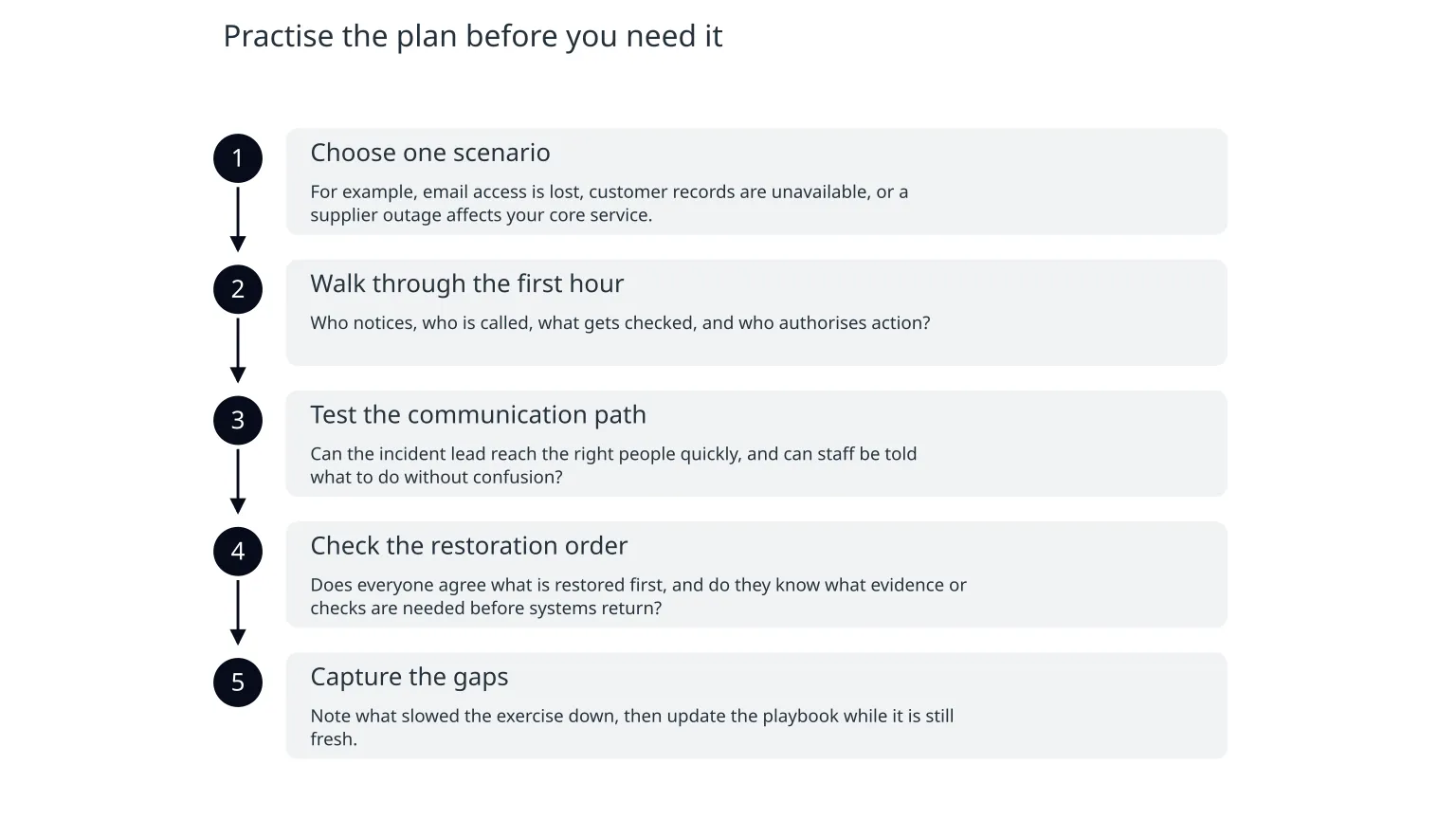
The NCSC recommends exercises and simulations so staff can practise responding and delegated decision-making can be tested. That does not require a formal war room. Even a short tabletop exercise can reveal gaps that are hard to see on paper.
- 1
Choose one scenario
For example, email access is lost, customer records are unavailable, or a supplier outage affects your core service.
- 2
Walk through the first hour
Who notices, who is called, what gets checked, and who authorises action?
- 3
Test the communication path
Can the incident lead reach the right people quickly, and can staff be told what to do without confusion?
- 4
Check the restoration order
Does everyone agree what is restored first, and do they know what evidence or checks are needed before systems return?
- 5
Capture the gaps
Note what slowed the exercise down, then update the playbook while it is still fresh.
The value of rehearsal is not perfection. It is that people learn how to behave when the normal rhythm breaks. NCSC notes that planning and rehearsing restoration in advance can speed recovery and increase confidence that restored systems are secure and fit for purpose.
- Use plain language, not jargon.
- Keep the exercise short enough that people will finish it.
- Record decisions, assumptions and missing contacts.
- Update the playbook after every exercise or real incident.
Include suppliers, data and communication
Incident-readiness should include third-party dependencies. The NCSC notes that disruptive incidents can also arise through suppliers, managed service providers and other external dependencies. If a key platform or outsourced support line goes down, your internal plan still needs to work.
Internal systems
Email, identity, core applications, files, backups and shared drives are obvious recovery items. They are usually under your direct control, but they can still fail if access or configuration is compromised.
External dependencies
Payment processors, cloud hosts, support tools, web providers and outsourced IT may be the real blocker. Include contact details, escalation routes and fallback options for each one.
Communication also needs attention. NCSC says recovery often takes longer than leaders expect, so honest updates about disruption and timelines matter. That does not mean promising a date you cannot keep. It means telling staff, customers and partners what is known, what is still being checked and when the next update will come.
0 of 4 complete
A practical starting point for this week
You do not need a perfect enterprise programme to improve readiness. A small business can make useful progress with one short working session and a few written decisions.
Name the incident lead
Choose one person who will coordinate the response and keep decisions moving.List the first three services to restore
Write them down in order, with a brief reason for each.Capture escalation contacts
Include internal and external people who may need to act quickly.Run one rehearsal
Test the plan with a short scenario and update the gaps afterwards.If you already have backups, that is a good start. But backups alone do not answer who decides, what comes back first or how the business will communicate while systems are still unstable. Those are the details that turn a recovery plan into something usable.
Start with decisions, not drama
The most useful incident-readiness work is calm and specific. Decide who leads, decide what gets restored first, and rehearse the first steps before pressure is high. That is the practical core of recovery planning, and it is available to businesses of almost any size.
If your team has never walked through a serious incident scenario, a short planning session can surface the missing pieces quickly. When the plan is clear, recovery is less improvised, communication is steadier and the business is more likely to keep moving while the incident is being understood.

About the author
Nixim Team, Product Engineering
Practical guidance from Nixim on building software, working with AI and running dependable cloud systems.