
How should a business choose between batch refresh, automatic page refresh, and near-real-time dashboards?
A practical guide to choosing the lightest dashboard refresh pattern that still supports the decision you need to make. It compares scheduled refresh, automatic page refresh and near-real-time pipelines in terms of freshness, monitoring and operational cost.

On this page
Why freshness mattersBatch refreshActive viewingNear-real-timeChoose the lightest patternMonitoringSafe next stepIn short
- Choose refresh speed based on the decision, not the technology.
- Batch refresh is usually the lightest and cheapest place to start.
- Automatic page refresh suits live operational views that people actively watch.
- Near-real-time pipelines add monitoring and cost, so use them only when delay matters.
- The real question is not “can we make it live?” but “what breaks if it is late?”
A dashboard does not need to be live just because it can be. The right refresh pattern depends on the decision being made, how quickly the underlying data changes, and how much operational effort you want to carry to keep the numbers current.
For many businesses, the best answer is not “as fast as possible”. It is “fast enough to support the next decision, with the least cost and complexity”. That usually means starting with batch refresh, moving to automatic page refresh only where a person is actively watching a changing screen, and reserving near-real-time pipelines for cases where delay itself creates a business problem. Microsoft, AWS and Google Cloud all describe these patterns in slightly different ways, but the practical choice is the same: match freshness to the use case, then monitor the pipeline so people know whether the dashboard is actually safe to trust.
Dashboard freshness should follow the decision
The first mistake is treating dashboard freshness as a generic technical preference. In practice, freshness is tied to the decision someone is trying to make. If a team reviews weekly performance, a daily or hourly refresh may be enough. If an operations lead is watching live incidents, waiting until tomorrow is too late. The correct pattern depends on how quickly the underlying data changes and how much delay the business can tolerate before the number stops being useful.
Microsoft’s guidance on content freshness makes a useful point: many people only need to rely on the designer’s scheduled or manual refresh, and can check timestamps or refresh information in the product to understand whether content is current. That is a good reminder that a dashboard can still be trustworthy without being live. Trust comes from clarity about when the data was last updated, not from maximum frequency by default.
Scheduled refresh is the lightest starting point
Scheduled refresh, sometimes called batch refresh, updates a dataset on a timetable rather than continuously. This is the simplest pattern to run and usually the easiest to understand. Microsoft notes that Power BI datasets can be scheduled, with up to eight refreshes a day on shared capacity and more on Premium capacity. That does not mean every dataset should be refreshed that often. It means the platform gives you a choice, and the right choice should still be driven by the business question.
This approach works well when data changes in chunks rather than constantly. Examples include daily orders, overnight finance postings, weekly pipeline reviews or a morning operations pack. In those cases, a scheduled refresh gives people a clear, predictable view without keeping infrastructure awake all day.
- Lower operational cost than live-query patterns.
- Easier to monitor and explain to non-technical users.
- Less pressure on source systems and data pipelines.
- Good fit for reports that support planning rather than live intervention.
The trade-off is obvious: numbers can be stale between refreshes. That is fine if nobody needs to act on the gap, but it becomes a problem when a team starts making real-time decisions from a delayed report. In other words, scheduled refresh is not “worse”; it is simply the right fit for a different kind of decision.
Automatic page refresh is for live screens, not every dashboard
Automatic page refresh is more specialised. Microsoft describes it as a feature for active report pages connected to DirectQuery sources, with fixed-interval refresh or change detection. It is designed for situations where someone is looking at the page while the underlying data changes. That might be a warehouse board, a support queue, a live sales monitor or an incident room screen.
The detail matters. Microsoft says the refresh interval should match the expected arrival rate of new data. If new data arrives every 20 minutes, setting the page to refresh every 5 minutes will not make the source update any faster. In some cases, very short intervals can even lead to less frequent updates than configured if queries do not complete in time. So automatic page refresh is not a shortcut to real-time truth. It is a controlled way to keep an actively viewed page current enough for operational use.
Scheduled refresh
Best when users can tolerate delay and the report does not need to follow rapid changes minute by minute.
Automatic page refresh
Best when a person is actively watching a page and needs the view to stay aligned with fresh source data.
Power BI’s documentation also notes that import-mode reports do not support automatic page refresh. That is another reason to choose this pattern carefully: it depends on the way the report is built as well as the business need. If your model is imported and only needs periodic updates, forcing a live pattern may add complexity without adding value.
Use near-real-time only when delay itself is a problem
Near-real-time is not the same as “a dashboard that refreshes quite often”. It usually means the underlying data pipeline is designed to move events quickly from source to reporting layer, with monitoring that can spot delay, backlog or failure. Google Cloud’s Datastream documentation frames freshness as pipeline latency, meaning the time between when data is written at the source and when the pipeline reads it. Google Cloud Dataflow monitoring also includes a data freshness chart and backlog signals, which shows that these systems need operational oversight, not just a dashboard refresh setting.
This is the most expensive pattern to run and maintain. You need stronger monitoring, more careful error handling and a clear answer to what happens when the stream falls behind. You also need to decide whether the business value of speed outweighs the cost of the extra machinery. For some decisions, it does. For many, it does not.
Illustrative example: an operations team tracking a live order exception queue may need the view to update quickly because staff are resolving issues throughout the day. In that case, near-real-time or a closely monitored fast-refresh pattern may help. By contrast, a monthly board pack does not need pipeline latency engineering. It needs a clear schedule and a reliable timestamp.
A practical way to choose
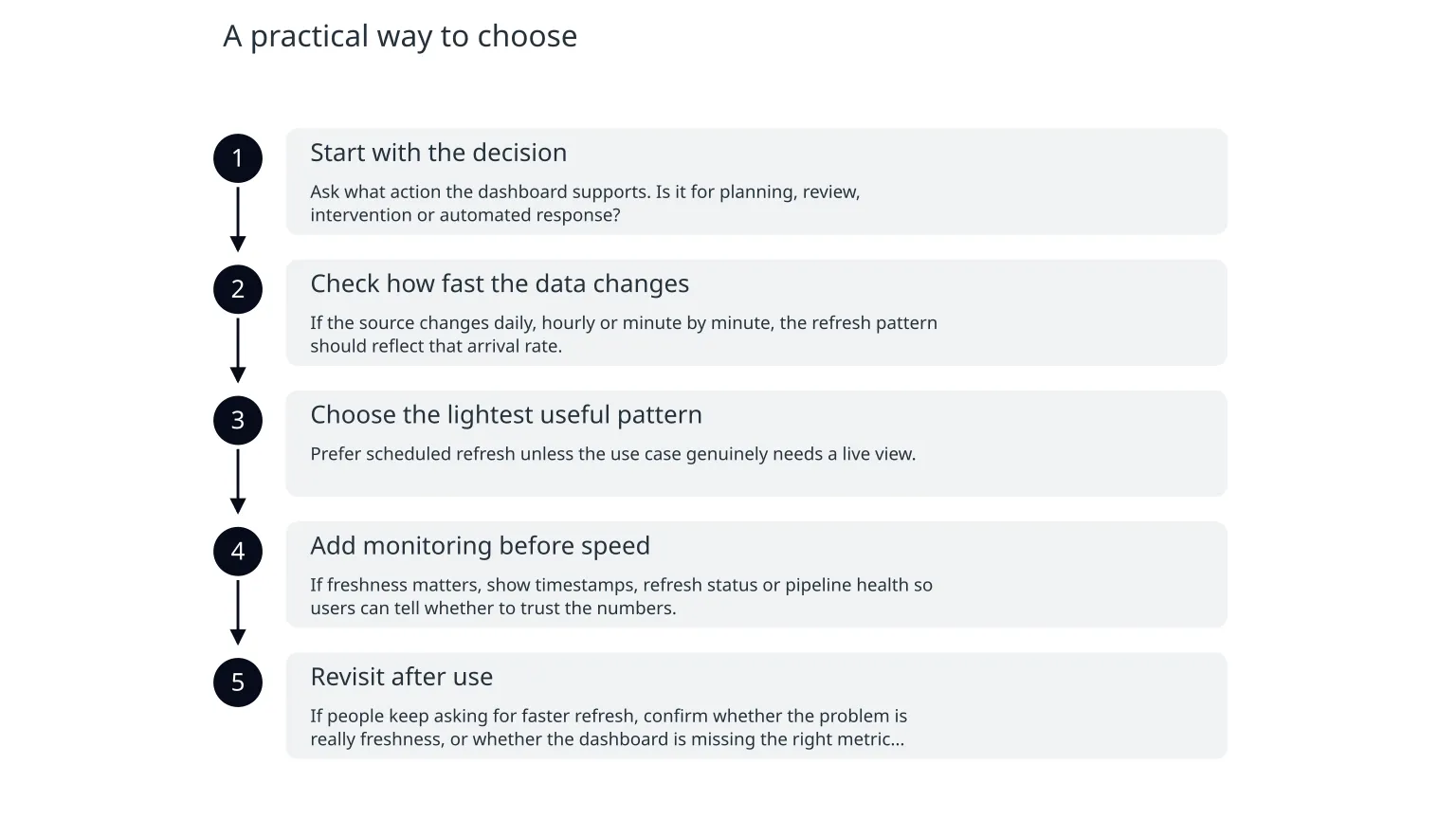
- 1
Start with the decision
Ask what action the dashboard supports. Is it for planning, review, intervention or automated response?
- 2
Check how fast the data changes
If the source changes daily, hourly or minute by minute, the refresh pattern should reflect that arrival rate.
- 3
Choose the lightest useful pattern
Prefer scheduled refresh unless the use case genuinely needs a live view.
- 4
Add monitoring before speed
If freshness matters, show timestamps, refresh status or pipeline health so users can tell whether to trust the numbers.
- 5
Revisit after use
If people keep asking for faster refresh, confirm whether the problem is really freshness, or whether the dashboard is missing the right metric entirely.
Freshness needs visibility, not just a faster pipeline
The most overlooked part of dashboard freshness is monitoring. A faster refresh is not helpful if users cannot tell whether it succeeded, failed or lagged behind. Microsoft recommends checking timestamps and refresh information in the product UI to understand whether content is current. That is a simple but important discipline: people should be able to see how fresh the data is before they act on it.
For more operational systems, freshness monitoring should include more than the dashboard itself. Pipeline tools may need backlog checks, failed-job alerts and a way to distinguish between a delayed source and a broken transformation. If the business depends on timely data, the team should know what “late” means, who gets alerted, and what the fallback view should show while the pipeline catches up.
| Pattern | Best for | Main trade-off |
|---|---|---|
| Scheduled refresh | Review, planning and periodic reporting | Numbers can be stale between refreshes |
| Automatic page refresh | Actively watched operational screens | More complexity and source pressure |
| Near-real-time pipeline | Cases where delay changes the decision | Highest monitoring and operating cost |
What to do next
0 of 6 complete
If you are designing a new dashboard, start with the lightest refresh pattern that still supports the decision. If you already have a dashboard, review whether you are paying for live freshness that nobody uses, or whether users are making decisions from data that is too old to trust. That small distinction can save cost, reduce noise and make the dashboard easier to own.
For teams that want help choosing the right pattern, the useful conversation is not about tools first. It is about the decision, the freshness requirement and the monitoring needed to keep the numbers honest. Once those are clear, the implementation becomes much simpler.

About the author
Nixim Team, Product Engineering
Practical guidance from Nixim on building software, working with AI and running dependable cloud systems.