
How to show dashboard freshness and data health where people make decisions
A practical guide to making dashboard trust visible. Learn how to surface freshness, upstream status and data-quality signals inside the dashboard itself, so people can tell whether the numbers are current, incomplete or safe to use before they act.
On this page
Why it mattersWhat to showHow to design itFreshness settingsExamplesRisksNext stepsIn short
- Show freshness in the dashboard, not only in a separate monitoring tool.
- Use simple labels: current, delayed, degraded, incomplete or unknown.
- Freshness is useful, but it is not the same as perfect accuracy.
- Link each signal back to the upstream issue so people can investigate quickly.
- Add clear rules for when a metric should be hidden, flagged or allowed with caution.
Dashboards often fail quietly. The chart still loads, the numbers still look neat, and the business still makes a decision — even if the data is stale, incomplete or broken upstream. The fix is not only better monitoring. It is to make data health visible where people already read the metrics.
This article explains how to show freshness and data-quality signals inside the dashboard itself, what each signal should mean, and where the limits are. It is written for founders, operators and analysts who need to trust a number before they act on it, not after the fact.
Why a dashboard can look fine and still mislead
A dashboard is only useful if the person reading it knows whether the figures are current enough to act on. That sounds obvious, but many teams hide freshness in a monitoring product, a warehouse log or a separate status page. The result is that the dashboard looks authoritative even when the underlying data is delayed or degraded.
Vendor documentation points in the same direction. dbt’s data health tile is designed to give stakeholders an at-a-glance view of whether dashboard data is stale or degraded, and it can link back to the upstream model for investigation. Datadog’s quality monitoring also treats freshness delay, row-count anomalies and column-level changes as signals that should be detected before downstream reporting or models are affected.
What a trustworthy dashboard should show at a glance
The goal is not to turn every dashboard into an engineering panel. It is to surface a small set of status signals that answer one question: should I trust this number right now?
| Signal | What it tells the reader | What it does not prove |
|---|---|---|
| Freshness | How recently the data was updated. | That every row is correct or complete. |
| Upstream status | Whether the source pipeline or model is healthy. | That business logic is right. |
| Quality checks | Whether key checks passed for volume, completeness, validity or uniqueness. | That every possible error has been caught. |
| Coverage window | What time period the chart includes. | That the chart reflects the latest business event. |
| Last successful refresh | When the latest good load completed. | That the next refresh will also succeed. |
Google Cloud’s auto data quality overview separates freshness, volume, completeness, validity, consistency, accuracy and uniqueness into different dimensions. That is a helpful reminder that “data quality” is not one thing. A dashboard should not imply that one green badge covers all possible failure modes.
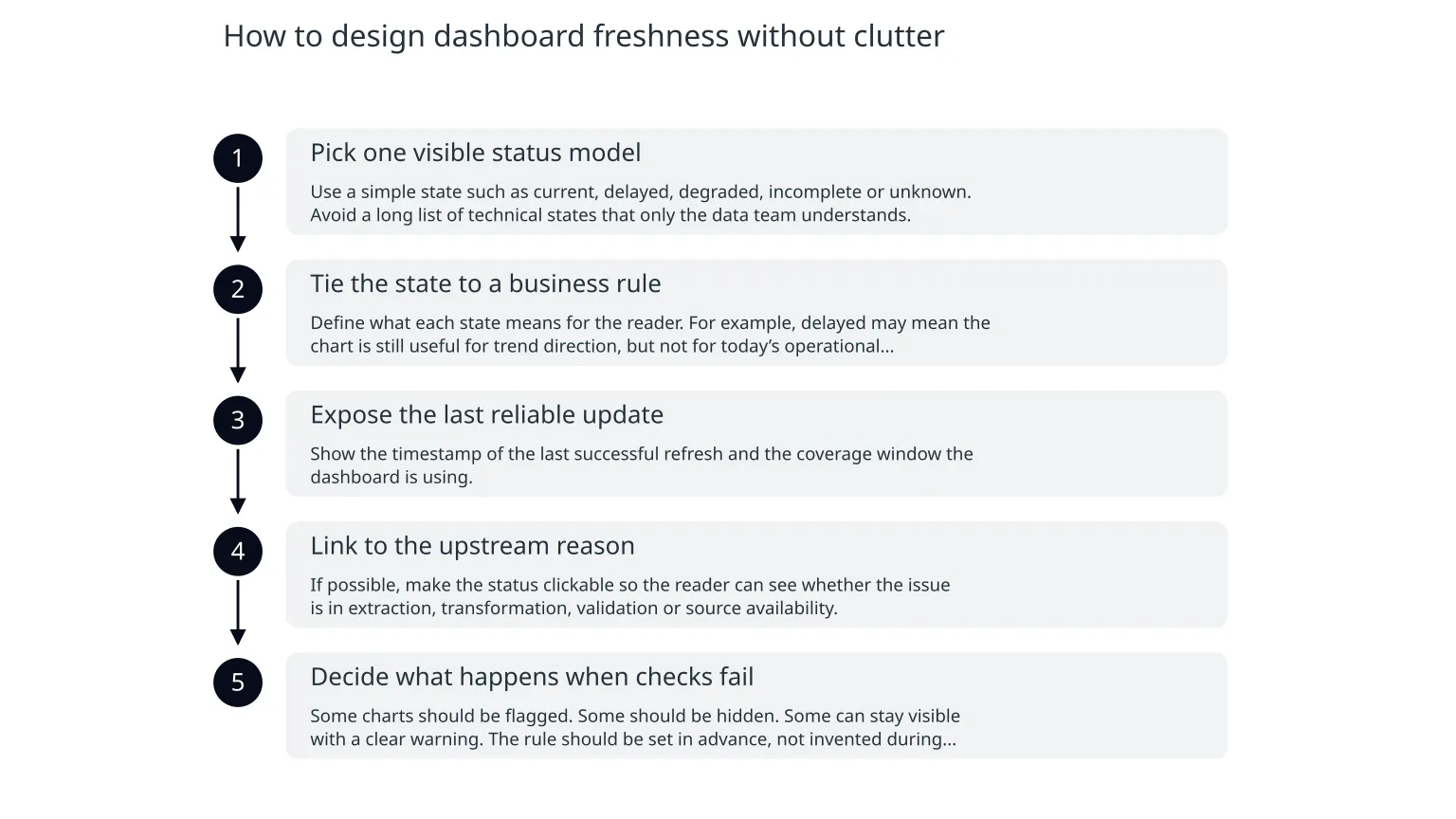
How to design dashboard freshness without clutter
- 1
Pick one visible status model
Use a simple state such as current, delayed, degraded, incomplete or unknown. Avoid a long list of technical states that only the data team understands.
- 2
Tie the state to a business rule
Define what each state means for the reader. For example, delayed may mean the chart is still useful for trend direction, but not for today’s operational decision.
- 3
Expose the last reliable update
Show the timestamp of the last successful refresh and the coverage window the dashboard is using.
- 4
Link to the upstream reason
If possible, make the status clickable so the reader can see whether the issue is in extraction, transformation, validation or source availability.
- 5
Decide what happens when checks fail
Some charts should be flagged. Some should be hidden. Some can stay visible with a clear warning. The rule should be set in advance, not invented during an incident.
A practical pattern is to place the freshness badge near the title of the dashboard or section, then add a small explanatory line beneath it. That keeps the signal visible without asking the reader to search for it.
Why freshness controls help, but do not solve everything
Looker Studio’s documentation shows that freshness settings are mainly a trade-off between more up-to-date information, performance and query cost. That matters because there is no free version of freshness: faster refreshes can mean more load, more cost or more pressure on the data source.
The same documentation also notes that freshness does not guarantee the data will be served from memory for the whole freshness interval, and that data source behaviour varies by connector and storage mode. In other words, a freshness policy is useful, but it is not the same as an absolute promise of real-time retrieval.
That is why the dashboard should show the freshness state in business language, while the platform underneath handles the technical refresh. Readers do not need every implementation detail. They do need enough context to know whether a chart is current, delayed or based on an older snapshot.
Illustrative examples of useful dashboard states
Example 1: sales dashboard
The headline chart shows a green Current badge with “Last refreshed 12 minutes ago”. A smaller note says the current day is partial until the next hourly load completes. If the load fails, the badge changes to Delayed and the chart shows the last completed hour rather than blanking the page.
Example 2: support dashboard
The ticket-volume chart shows a yellow Degraded badge because one source system is missing a batch. The dashboard still displays the trend, but the explanatory line says the latest hour is incomplete and should not be used for staffing decisions until the next refresh passes.
These are illustrative patterns, not a universal template. A finance dashboard may need stricter rules than an internal usage dashboard. A customer-facing report may need more conservative labelling than an analyst workbench.
What can go wrong if you use these signals badly
- Treating freshness as a proxy for truth, when it only tells you how current the data is.
- Showing too many technical states and making the dashboard harder to scan.
- Leaving the status visible but not actionable, so users still guess what to do next.
- Hiding degraded data behind a small badge that no one notices.
- Allowing stale charts to stay green because no one agreed the failure threshold in advance.
There is also a governance risk. If teams rely on the dashboard status without agreeing on ownership, they may assume someone else is watching the pipeline. A visible badge does not replace an operating process. It should be backed by a clear owner, a defined check, and a named escalation path.
A sensible starting sequence for a small team
0 of 7 complete
If you are building this for the first time, start small. One visible freshness indicator on one important dashboard is more useful than a perfect but invisible monitoring setup. Once the pattern works, expand it to the other reports that drive decisions.

About the author
Nixim Team, Product Engineering
Practical guidance from Nixim on building software, working with AI and running dependable cloud systems.