
How to keep AI useful, responsive and affordable once it moves beyond a pilot
Practical governance for AI assistants and workflow automation: how project-level controls, prompt caching, approval points and usage guardrails help teams keep performance, cost and risk in balance after launch.

On this page
Why it changesCachingControlsApprovalsAccessWhat it looks likeNext stepsIn short
- A pilot becomes harder to run once real users, wider prompts and manual approvals are added.
- The main controls are cache reuse, spend limits, access rules and clear approval points.
- Caching helps only when prompts stay stable enough to be reused.
- Hard spend limits and project-level controls help prevent surprise bills and accidental overuse.
- AI actions should pause for review when the result is ambiguous or high risk.
A pilot can look impressive when the user count is small and the prompts are predictable. The harder part starts when real users arrive, the prompt mix widens and people expect the system to be fast every time. At that point, AI projects often need more than a better model. They need governance: controls that keep the system responsive, limit avoidable cost and stop risky actions from happening without review.
OpenAI’s recent platform changes are a useful prompt for this conversation because they point to the issues production teams actually face: cache reuse, spend control, permissions and approval points. Those features do not remove the need for design discipline, but they do make it easier to put sensible guardrails around an AI assistant or workflow automation before it becomes noisy, slow or expensive.
Why production AI needs different controls
During a pilot, teams often optimise for learning speed. They test prompts, tweak behaviour and accept a bit of manual checking because the system is still proving itself. Once the tool is live, the priority shifts. Users expect consistent responses, operators need predictable costs and the business needs to know who can do what. That is why AI governance is not a nice-to-have at launch; it becomes part of the product.
The practical problem is usually not one big failure. It is a slow drift: prompts get longer, more tools are added, humans are pulled in for exceptions, and the bill rises even when usage looks healthy. If you wait until that happens, the fix is often awkward. It is better to design the controls early, then tune them as real usage appears.
Use prompt caching where the prompt really is reusable
Prompt caching is most valuable when a large part of the request stays the same from call to call. OpenAI’s documentation says 12-hour prompt caching is available for the Responses API, and that reused instructions, tools and context can benefit from lower cached-input pricing. The same documentation explains that cache diagnostics can show how much reuse you are getting and why a cache miss happened.
That sounds technical, but the business idea is simple: do not pay repeatedly for the same stable context if the platform can safely reuse it. In an assistant, that might include system instructions, fixed policy text or a standard knowledge block. In a workflow, it might include common validation steps or repeated routing instructions.
The trade-off is that caching only helps when the prefix remains stable. OpenAI’s prompt-caching guide says cache breakpoints matter, the minimum cacheable prompt length is 1,024 tokens for GPT-5.6 and later, and changes before a breakpoint can prevent reuse. In other words, if your team keeps editing the opening section of every prompt, the cache may never earn its keep.
Put cost, access and scope controls around the project
If AI usage can grow quickly, the team needs limits that are visible and enforceable. OpenAI’s rate-limit guidance notes that limits are enforced at organisation and project level, and that spend limits can be configured separately from usage limits. It also says hard spend limits return a 429 error once the monthly cap is reached.
That matters because a system can be busy for the wrong reasons. An automation may be retrying too often, a prompt may be too long, or a poorly scoped integration may be generating more calls than expected. A spend limit will not explain the cause, but it can stop the problem from becoming a bigger bill while you investigate.
Project-level controls
Useful when you want different budgets, models or permissions for different products, teams or experiments. They help keep a pilot separate from production.
User-by-user assumptions
Too loose for shared systems. A single person can still trigger usage on behalf of many customers, so project controls are usually safer than relying on individual discipline.
OpenAI’s changelog also says organisations can restrict which service tiers projects are allowed to use. That is important for businesses that want to prevent accidental upgrades, uncontrolled experimentation or the use of a more expensive tier without review. For a founder or product lead, this is less about bureaucracy and more about making sure cost and performance choices are deliberate.
- Set a separate budget for pilots and production systems.
- Restrict service tiers unless a specific project genuinely needs more capacity.
- Review usage by project rather than only by total organisation spend.
- Keep a simple escalation path for anyone who hits a limit or sees unusual usage.
Decide where AI must stop and ask
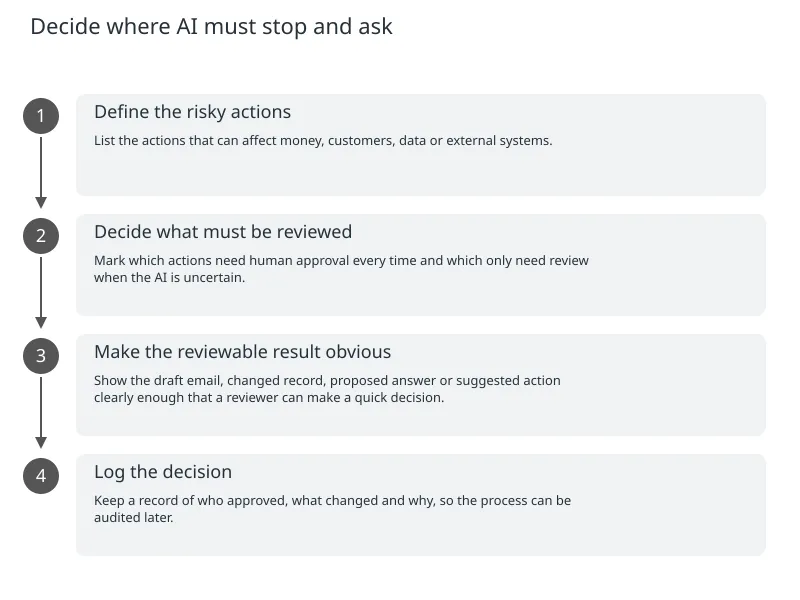
One of the biggest governance mistakes is assuming that a working model should automatically be allowed to act. OpenAI’s guardrails and human review guidance says ambiguous or high-risk actions should pause for explicit human approval before the tool runs. Its latest-model guidance adds that approval is best requested only after there is a concrete, reviewable result, such as before deploying a change or publishing a site.
That principle applies well beyond software deployment. If an assistant is sending emails, updating records, changing pricing, issuing refunds or routing customer cases, it should not guess when the outcome is uncertain. A person should review the proposed action when the decision is consequential or the confidence is low.
- 1
Define the risky actions
List the actions that can affect money, customers, data or external systems.
- 2
Decide what must be reviewed
Mark which actions need human approval every time and which only need review when the AI is uncertain.
- 3
Make the reviewable result obvious
Show the draft email, changed record, proposed answer or suggested action clearly enough that a reviewer can make a quick decision.
- 4
Log the decision
Keep a record of who approved, what changed and why, so the process can be audited later.
Keep permissions narrow and easy to review
AI systems become harder to manage when too many people can change prompts, tools, budgets or deployment settings. OpenAI’s RBAC guidance says permissions can be managed across the organisation and projects, in both the API and the Dashboard, using least-privilege roles and group-based access.
That is a sensible fit for small teams as well as larger ones. The founder who owns the commercial decision does not need to be the one editing prompts. The engineer who maintains the integration does not need full billing control. The support lead may need to view results and approve exceptions, but not change the model setup.
Good practice
Give each role the smallest level of access needed for its job. Review permissions when people change responsibilities, and remove access when it is no longer required.
Risk to avoid
Using shared admin access for convenience. It makes troubleshooting easier in the short term, but it blurs accountability and increases the chance of accidental changes.
In practical terms, this is governance that helps speed rather than slows it down. Clear ownership means fewer surprises, quicker troubleshooting and a better handover if the original builder is unavailable.
A simple operating model for a live assistant
A useful production setup does not need to be complicated. It needs to be consistent. The business should know which parts of the prompt are fixed, which users or teams can change settings, where the approval points sit and what happens when a limit is hit.
| Control area | What it does | Why it matters |
|---|---|---|
| Prompt structure | Separates stable context from changing user input | Improves cache reuse and reduces unnecessary rework |
| Spend limits | Stops the project at a defined monthly cap | Prevents unexpected overuse while you inspect the cause |
| Service-tier restrictions | Limits which cost/performance levels projects can use | Avoids accidental upgrades or uncontrolled experimentation |
| RBAC | Restricts who can edit, approve or deploy | Reduces mistakes and keeps accountability clear |
| Human approval | Pauses risky or ambiguous actions | Stops the system acting on uncertain or high-impact decisions |
The important point is that these controls should be built into the operating rhythm, not bolted on after a problem appears. If a weekly review shows prompt changes, cache misses and spend trends together, the team can see whether the system is getting more efficient or simply more expensive.
How to move from pilot to controlled production
0 of 6 complete
If you are planning an AI assistant, chatbot or workflow automation, the question is not whether the platform has controls. The question is whether your team has decided where they belong. That is usually the difference between a pilot that quietly becomes operational and one that slowly turns into a cost centre.

About the author
Nixim Team, Product Engineering
Practical guidance from Nixim on building software, working with AI and running dependable cloud systems.