
SnapStart or Provisioned Concurrency? How to choose the right Lambda latency fix
A practical comparison of AWS Lambda SnapStart and Provisioned Concurrency for teams whose functions are starting to feel slow. It explains how each option works, when it fits, what it costs operationally, and how to choose based on workload shape, latency target and simplicity.

On this page
Why it mattersHow they workDecision factorsTrade-offsDecision treeExamplesChecks before changeWhen to get helpIn short
- SnapStart is usually the simpler first step if your runtime is supported and you mainly want better startup performance.
- Provisioned Concurrency is the better fit when the function is user-facing and needs consistently low latency.
- SnapStart does not guarantee cold starts disappear, and it is not compatible with Provisioned Concurrency.
- Provisioned Concurrency adds a direct running cost because you pay for configured capacity even before requests arrive.
- The right choice depends on whether the workload is synchronous, how strict the latency target is, and how much operational overhead you can accept.
When a Lambda function starts to feel slow, the answer is not always “make it warmer”. The real decision is whether you need a lower-ops optimisation that improves startup time in some cases, or a paid always-ready capacity model for consistently low latency. AWS offers both SnapStart and Provisioned Concurrency, but they suit different workloads and different tolerance for operational cost.
This guide compares them in plain language for founders, technical leads and small teams running AWS-based products. The focus is not on buzzwords, but on how the workload behaves, what latency the user actually notices, and how much operational simplicity you want to keep as usage grows.
Why the choice matters once latency starts to show
The problem is not just speed
Lambda cold starts become a business problem when a user-facing request feels inconsistent. At that point, you are not only tuning performance; you are choosing an operating model. SnapStart improves startup latency by restoring from a pre-initialised snapshot, while Provisioned Concurrency keeps function instances ready to serve requests.
Two different ways to buy speed
Those two approaches sound similar, but they solve different problems. SnapStart aims to reduce startup delay with less operational overhead. Provisioned Concurrency is for workloads where latency needs to be predictable, including synchronously invoked APIs and interactive microservices.
How each option works in practice
SnapStart
AWS snapshots an initialised function version and restores from that snapshot to reduce startup latency. It is a best-effort optimisation, so it helps with cold-start pain but does not promise that every cold start disappears.
Provisioned Concurrency
AWS keeps a configured number of function instances initialised and ready to serve. That makes it the more direct way to hold latency steady, especially for APIs and interactive services where a slow first response is visible to users.
Important operational difference
SnapStart is enabled on published function versions and aliases that point to versions. Provisioned Concurrency is a capacity setting you keep on for a chosen amount of time. In other words, SnapStart is a startup optimisation; Provisioned Concurrency is a standing readiness decision.
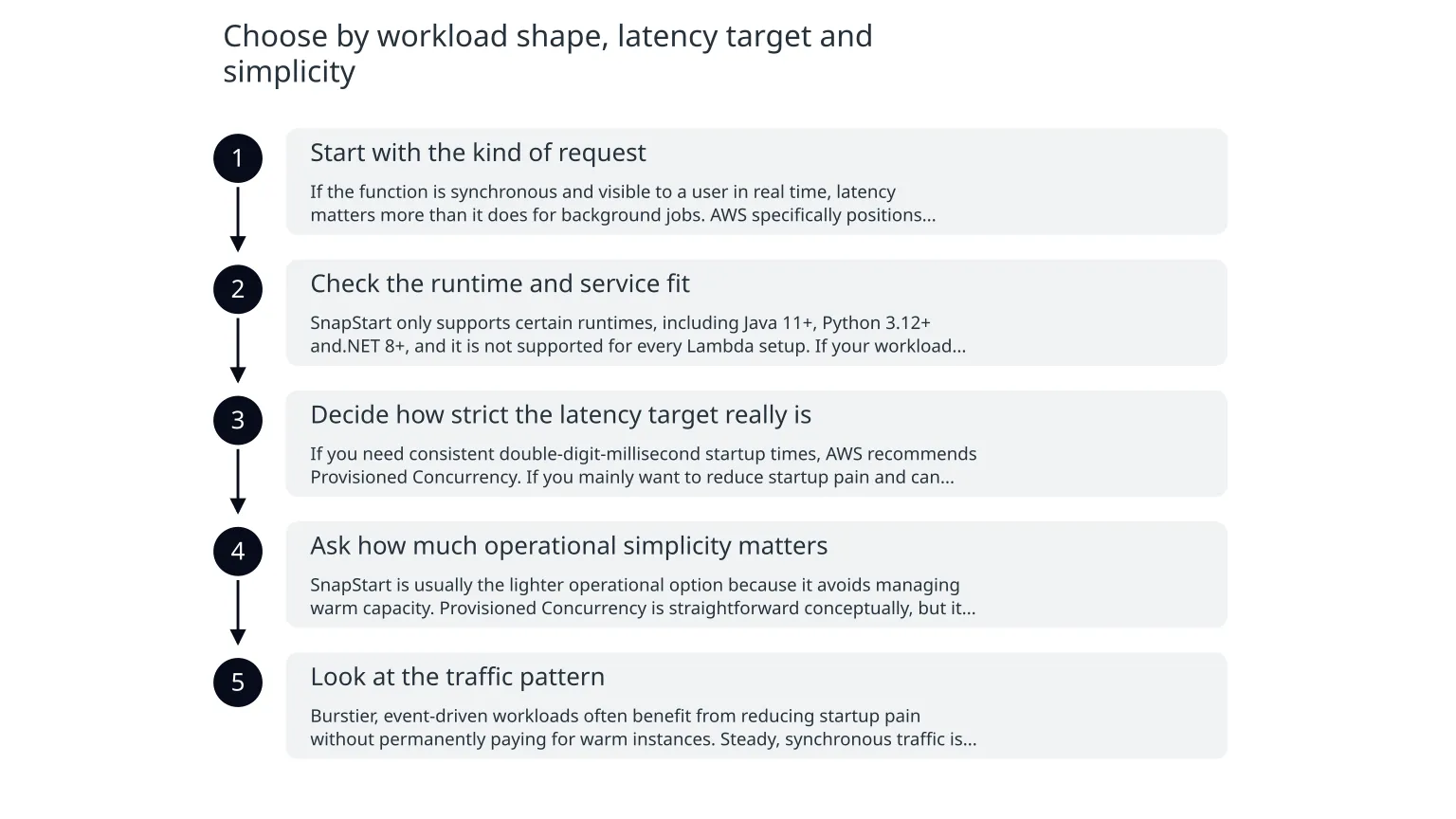
Choose by workload shape, latency target and simplicity
- 1
Start with the kind of request
If the function is synchronous and visible to a user in real time, latency matters more than it does for background jobs. AWS specifically positions Provisioned Concurrency for latency-sensitive applications such as web and mobile backends, synchronously invoked APIs and interactive microservices.
- 2
Check the runtime and service fit
SnapStart only supports certain runtimes, including Java 11+, Python 3.12+ and.NET 8+, and it is not supported for every Lambda setup. If your workload depends on features SnapStart does not support, that narrows the choice quickly.
- 3
Decide how strict the latency target really is
If you need consistent double-digit-millisecond startup times, AWS recommends Provisioned Concurrency. If you mainly want to reduce startup pain and can tolerate some variability, SnapStart may be enough.
- 4
Ask how much operational simplicity matters
SnapStart is usually the lighter operational option because it avoids managing warm capacity. Provisioned Concurrency is straightforward conceptually, but it does mean carrying an explicit readiness cost and monitoring that configured concurrency stays appropriate as traffic changes.
- 5
Look at the traffic pattern
Burstier, event-driven workloads often benefit from reducing startup pain without permanently paying for warm instances. Steady, synchronous traffic is easier to justify with Provisioned Concurrency because the cost is easier to relate to the user experience you are protecting.
What you gain, and what you pay
| Question | SnapStart | Provisioned Concurrency |
|---|---|---|
| Main benefit | Lower startup latency with less ongoing operational work | Predictable low latency for configured capacity |
| Best fit | Supported runtimes and workloads where some variability is acceptable | User-facing APIs and interactive services that need steady response times |
| Cost shape | No warm-capacity charge, but still subject to normal Lambda charges when invoked | Charged for configured concurrency and the time it is enabled, rounded up to the nearest five minutes; request and duration charges still apply |
| Operational complexity | Usually simpler to run | More deliberate to size, monitor and adjust |
| Key limitation | Best-effort only; cold starts are not guaranteed to disappear | You pay for readiness even when traffic is low |
A practical warning
The most common mistake is paying for a stronger latency control than the workload actually needs. Another is assuming SnapStart is a universal fix. It is not. AWS notes that SnapStart does not support Provisioned Concurrency, Amazon EFS, Amazon S3 Files, or ephemeral storage above 512 MB.
A simple decision tree for APIs and event-driven services
- 1
Is the function user-facing and synchronous?
If yes, move toward Provisioned Concurrency if latency consistency is important. If no, and the work is background or event-driven, SnapStart may be enough if the runtime is supported.
- 2
Do you need consistently low startup times or just fewer slow outliers?
If the business needs predictable low latency, especially for live APIs, Provisioned Concurrency is the safer fit. If you mainly want a cheaper improvement that reduces startup delay, SnapStart is a better first look.
- 3
Is the runtime supported by SnapStart?
If not, the choice is made for you: use Provisioned Concurrency or another mitigation strategy.
- 4
Can you justify paying for warm readiness?
If traffic is uneven or the user experience does not justify the extra cost, avoid paying for always-ready capacity. If the workload is important enough that a slow first response is costly, Provisioned Concurrency may be the right expense.
- 5
Do you want the simplest operating model?
If yes, try the lighter option first where it is valid. If the team already knows the workload needs strict latency control, go directly to Provisioned Concurrency rather than layering on extra tuning.
Illustrative examples of where each option fits
Illustrative example: event-driven processing
A team runs a batch of incoming events through Lambda, and the work is not shown directly to a customer. Occasional startup delay is annoying but not critical. If the runtime is supported, SnapStart may reduce the visible spikes without adding a standing warm-capacity bill.
Illustrative example: customer-facing API
A checkout or account API must feel consistently responsive during active use. A slow first call is visible and may affect confidence in the product. In that case, Provisioned Concurrency is easier to justify because the workload has a clear latency target and a direct user impact.
What to check before you switch anything
0 of 7 complete
Where specialist help is useful
The decision is not only technical
A good answer depends on traffic shape, latency sensitivity, runtime support and the cost of keeping capacity warm. That is why teams sometimes need help to model the trade-off instead of guessing from one dashboard view. Cloud architecture support is useful when you want to review the workload, check the migration path if changes are needed, and avoid paying for performance you do not actually need.
A sensible next step
Start with the simpler question: is this a user-facing function that needs predictable latency, or a workload where reducing startup pain is enough? If the answer is unclear, a short architecture review can help you map the function, the traffic pattern and the cost of each option before you commit to a change.

About the author
Nixim Team, Product Engineering
Practical guidance from Nixim on building software, working with AI and running dependable cloud systems.