
What to do when your AI model gets deprecated
A practical guide to avoiding lock-in when an AI model vendor changes or retires an API. It explains model-agnostic design, fallback routing, version checks and a simple deprecation checklist for small teams.

On this page
Why it mattersBuild for changeRoutingVersion checksChecklistWhen to ask for helpIn short
- Use a provider wrapper so the rest of your app does not speak directly to one model API.
- Keep routing, model selection and fallback rules outside your business logic.
- Track version, deprecation and removal dates in one place, then review them regularly.
- Test migrations before the deadline, not after users find the breakage.
- A small deprecation checklist is usually enough for early-stage products.
Model changes are not just technical housekeeping. If your app is tightly coupled to one provider, a deprecation can force product work you did not plan for. OpenAI’s deprecations page is a timely reminder that model surfaces, APIs and prompt tooling can all move on a schedule. The good news is that small teams do not need a huge platform programme to reduce the risk. A few design choices early on can make migrations much less painful.
Why model deprecations can break more than you expect
When a model vendor changes an API or retires a model, the obvious risk is a failed request. The less obvious risk is that model names, request shapes, prompt formats, tool calls and output assumptions may all be scattered through your codebase. That is what turns a small vendor change into a product rewrite.
OpenAI’s deprecations page shows that these changes are real and scheduled. It notes deprecation and removal dates for some GPT-4 series models and recommends a replacement path, and it also shows a full API migration path for the Assistants API. The point is not that one vendor is unusual. The point is that any production AI feature should expect change.
Design your app so the model is replaceable
The simplest protection is to avoid calling the vendor SDK directly from every feature. Put model access behind a small internal service, adapter or gateway. Your product code should ask for a task outcome — such as summarising text, drafting a reply or classifying a document — rather than know which model version will do it.
Bad coupling
Prompt text, model name, temperature, tool schema and retry rules are hard-coded in multiple files. A vendor change means searching the whole repo and hoping nothing was missed.
Better design
One internal interface handles model selection, prompt templates, retries, logging and response parsing. Swapping providers or versions happens in one place.
This does not mean every model decision must be hidden. In some products, you may want certain tasks to use a cheaper model and others to use a stronger one. The goal is not to remove control. The goal is to centralise it so changes are deliberate instead of accidental.
- Create one wrapper for all model calls.
- Keep prompt templates in versioned files or a prompt registry.
- Use task names such as 'support_reply' or 'invoice_extract' instead of provider-specific model names in business code.
- Record the model version used for each important request or workflow step.
- Make it easy to switch to a backup model without editing core product logic.
Use fallback routing, but keep it simple
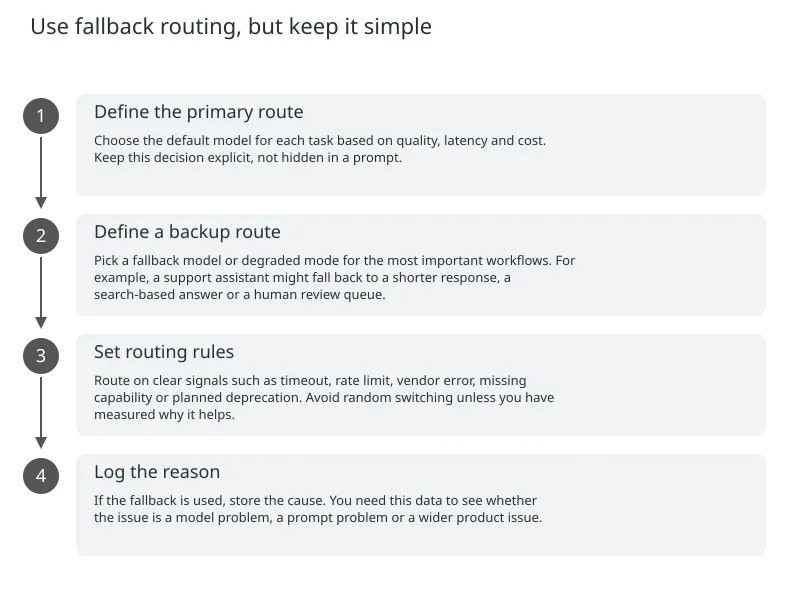
Fallback routing means your app can try another model or another path if the preferred one fails, becomes too slow or reaches a deprecation window. For a small team, this is usually more useful than a complex multi-model optimisation system.
- 1
Define the primary route
Choose the default model for each task based on quality, latency and cost. Keep this decision explicit, not hidden in a prompt.
- 2
Define a backup route
Pick a fallback model or degraded mode for the most important workflows. For example, a support assistant might fall back to a shorter response, a search-based answer or a human review queue.
- 3
Set routing rules
Route on clear signals such as timeout, rate limit, vendor error, missing capability or planned deprecation. Avoid random switching unless you have measured why it helps.
- 4
Log the reason
If the fallback is used, store the cause. You need this data to see whether the issue is a model problem, a prompt problem or a wider product issue.
Check versions before users feel the pain
Version checks are the part many teams skip until the end. They are worth doing earlier. If your app knows which model, API version or prompt object it depends on, you can compare that against a stored allowlist or deprecation calendar before each release.
OpenAI’s documentation repeatedly points developers back to the deprecations page when using model and response APIs, and its guidance says reusable prompt objects are themselves being deprecated. That is a useful pattern to follow in your own product: do not rely on memory, Slack messages or one person’s notebook.
| What to track | Why it matters | Simple place to store it |
|---|---|---|
| Model name and version | Tells you exactly what the app is using | Config file or environment config |
| Vendor deprecation date | Shows when migration work must finish | Shared calendar or issue tracker |
| Prompt or workflow version | Helps you compare behaviour over time | Versioned repo folder or registry |
| Fallback route | Shows what happens if the main path fails | Routing config or feature flag |
| Owner | Makes sure someone checks the deadline | Team board or maintenance rota |
A simple deprecation checklist for small teams
0 of 8 complete
Where specialist support can save time
Teams often ask for help when they already feel the pressure of a live deadline. That can still be a good moment to bring in support, but the most useful intervention is usually earlier: during architecture design, before model calls are spread across the app.
Specialist help is most useful if you need a clean model abstraction, safe fallback routing, migration planning or a broader product review across AI, cloud and deployment. For some teams, the real issue is not just model deprecation. It is that the app lacks ownership, observability or a clear handover path.
If you are building an AI feature into a customer-facing product, the goal is to make change boring. That means knowing what depends on the vendor, what can fail gracefully and what must be tested before release. If that is the kind of work you are planning, a scoped product engineering review can help you separate immediate fixes from longer-term platform work.

About the author
Nixim Team, Product Engineering
Practical guidance from Nixim on building software, working with AI and running dependable cloud systems.