
Which accounts should get phishing-resistant MFA first in a small business?
If you cannot upgrade authentication for every account at once, start with the accounts that can expose email, money, admin controls or shared workspaces. This guide explains why those accounts matter most, what stronger authentication changes in practice, and how to roll it out without creating confusion for the team.
On this page
Why firstPriority orderStronger MFARolloutMistakesNext stepIn short
- Start with business email, because one inbox can expose resets, approvals and sensitive information.
- Protect administrator and privileged accounts next, because they can change settings, access data and widen an intrusion quickly.
- Give finance and payment-related accounts stronger MFA, especially where payment approvals or banking access live in email or admin tools.
- Treat collaboration accounts as high value if they contain shared files, customer data or internal permissions.
- Use the strongest available option for the highest-risk accounts, and a simpler option only where the business impact is lower and the tool supports it.
If a team cannot improve authentication everywhere at once, the best move is not to spread effort thinly. It is to protect the accounts that would let an attacker do the most damage if they were taken over. In a small business, that usually means email, administrator accounts, finance tools and shared collaboration systems first. Official guidance from the NCSC, CISA and Microsoft points in the same direction: make important accounts harder to phish, keep privileged access to the minimum necessary, and use stronger authentication where the consequences of compromise are highest.
That does not mean every other account is unimportant. It means priorities should follow business risk, not just the order in which usernames appear on a spreadsheet.
Why prioritisation matters when you cannot do everything at once
Many small businesses know they should strengthen logins, but the real question is where to begin. If you can only improve a few accounts first, focus on the ones that create the largest blast radius if compromised. The NCSC explains that business email is a common target because one inbox can reveal private information, help attackers impersonate the business, and make password resets for other accounts easier to hijack. That makes email a natural starting point, not because it is the only risk, but because it is often the easiest route into everything else.
The same logic applies to administrator and privileged accounts. CISA recommends phishing-resistant MFA for administrator and privileged users, including accounts that can reach customer or financial data. Microsoft’s guidance likewise treats priority accounts — such as CEOs, CFOs, infrastructure admins and build-system accounts — as higher-risk targets that need stronger protection than ordinary user accounts.
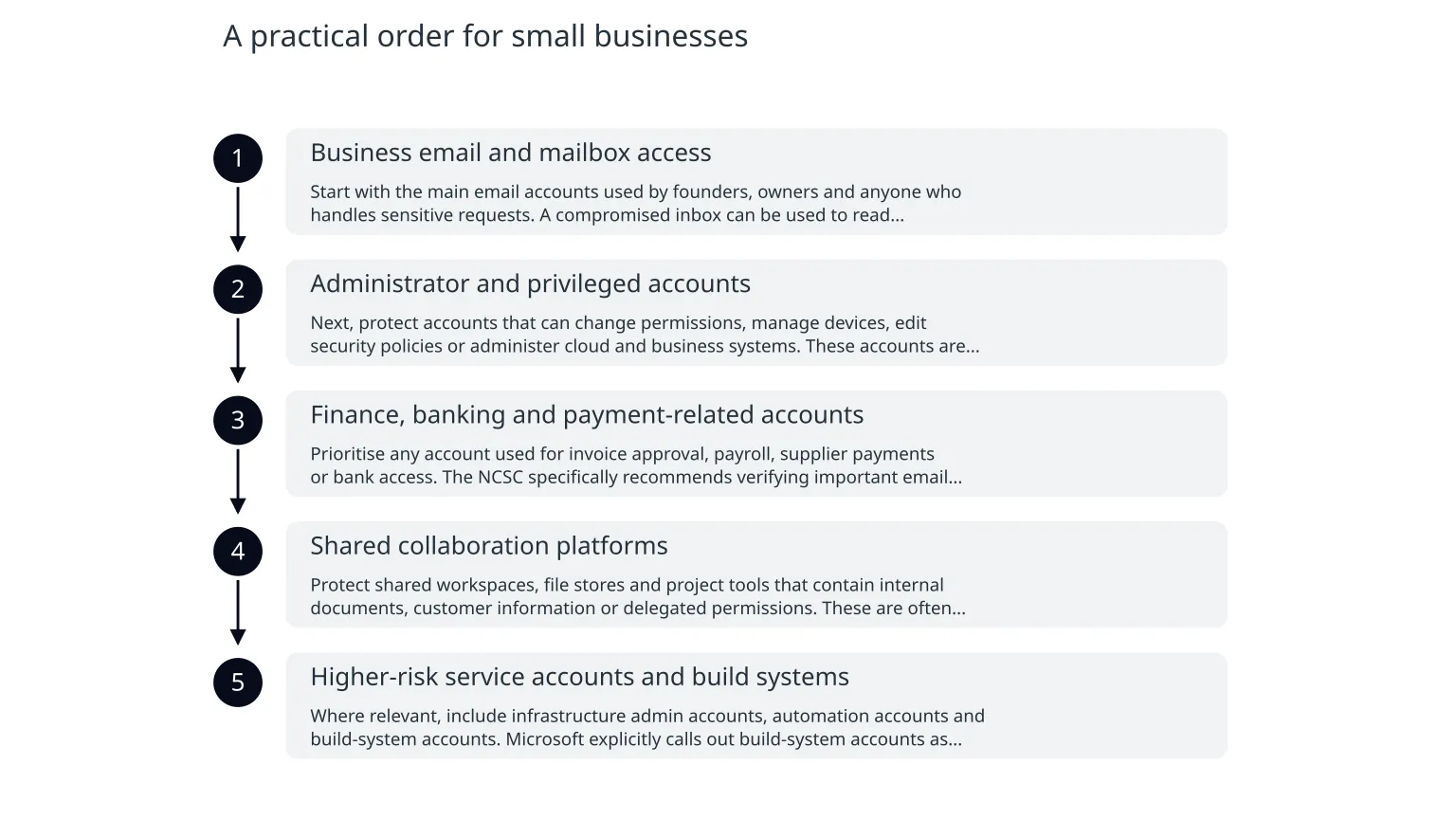
A practical order for small businesses
- 1
Business email and mailbox access
Start with the main email accounts used by founders, owners and anyone who handles sensitive requests. A compromised inbox can be used to read confidential messages, impersonate staff, request fraudulent payments or trigger resets on other services.
- 2
Administrator and privileged accounts
Next, protect accounts that can change permissions, manage devices, edit security policies or administer cloud and business systems. These accounts are attractive because one successful login can quickly widen access across the organisation.
- 3
Finance, banking and payment-related accounts
Prioritise any account used for invoice approval, payroll, supplier payments or bank access. The NCSC specifically recommends verifying important email requests through a separate communication method, which is especially relevant when a message could lead to a payment or account recovery action.
- 4
Shared collaboration platforms
Protect shared workspaces, file stores and project tools that contain internal documents, customer information or delegated permissions. These are often overlooked because they do not feel as sensitive as email, but they can still reveal business data or support impersonation.
- 5
Higher-risk service accounts and build systems
Where relevant, include infrastructure admin accounts, automation accounts and build-system accounts. Microsoft explicitly calls out build-system accounts as priority accounts because they can influence software delivery and related trust chains.
What weaker MFA choices change on high-value accounts
Not all MFA methods offer the same resistance to phishing. Some options can still be tricked by a fake login page, push fatigue or social engineering. For the accounts above, guidance from CISA and Microsoft points toward phishing-resistant MFA where possible, especially for administrators and privileged users. The benefit is straightforward: the login method is harder for an attacker to reuse after stealing a password or luring someone to a convincing fake site.
This matters more as account value rises. A weaker factor on a low-risk account may be inconvenient but containable. The same weakness on a shared mailbox, finance account or admin login can give an attacker a better chance to move sideways through the business. That is why the right question is not only, “Do we have MFA?” but also, “Is the MFA strong enough for what this account can do?”
Higher-risk accounts
Use the strongest available authentication the platform supports. Make recovery more careful. Review who should have access at all. Treat these accounts as security-critical, not just convenience-critical.
Lower-risk accounts
Use the strongest practical option available, but prioritise the accounts that would cause the greatest harm if compromised. A phased rollout is reasonable when resources are limited.
A practical safeguard is to match the strength of authentication to the privilege of the account. The more that account can see, change or approve, the more resistant it should be to phishing. That does not eliminate risk, but it reduces the chance that one stolen password becomes a business-wide problem.
How to roll it out without breaking everyday work
0 of 7 complete
The rollout should be operationally simple. One common mistake is to add a new login method without cleaning up shared access, old accounts or unclear ownership. Another is to rely on email alone for verifying account recovery or payment changes. The NCSC’s guidance to confirm important requests through a separate channel matters because email itself is often the thing under attack.
Illustrative example: if a finance inbox receives an urgent supplier change request, the safer move is to verify it by phone or another trusted channel before any bank details are updated. Likewise, if a founder’s mailbox is used to reset access to other systems, that mailbox deserves stronger protection than a typical user account.
Common mistakes to avoid
- Treating all accounts as equally important, which can waste effort on low-value logins while critical ones remain easier to phish.
- Protecting a shared inbox but leaving admin consoles with weaker sign-in protection.
- Assuming MFA alone is enough without reviewing account ownership, recovery and privilege levels.
- Using the same recovery process for every account, even when the account can move money or change security settings.
- Forgetting collaboration tools, where shared documents and permissions can expose valuable information.
What to do next
- Start with business email, privileged/admin accounts, finance access and shared collaboration systems.
- Use phishing-resistant MFA first on the accounts that could expose data, money or control.
- Remove unnecessary access before expanding stronger authentication more widely.
- Verify sensitive requests through a separate channel, especially for payments and account recovery.
- Keep the rollout practical: document ownership, test recovery and expand in phases rather than waiting for perfection.
If you need a simple starting point, make a list of the five accounts that would be hardest to recover from if they were compromised. Those are usually the right first candidates for stronger authentication. From there, extend the same logic to any other login that can approve money, change security settings or unlock access to important systems. That approach is both more realistic and more defensible than trying to fix everything in one pass.

About the author
Nixim Team, Product Engineering
Practical guidance from Nixim on building software, working with AI and running dependable cloud systems.